Activate security.manager
In this tutorial, you will learn
-
how to set the sharing level in ArcGIS Portal and
-
how to enable security.manager NEXT for the SampleWorldCities service.
This tutorial was tested for ArcGIS Enterprise 11.5 in December, 2025.
Prerequisites
Check the preconditions for this tutorial:
-
security.manager NEXT is installed.
-
You have access to two user accounts:
-
An administrative user account to administer security.manager and Portal.
-
A non-administrative user account to test the access.
-
-
You can use the service SampleWorldCities for this tutorial, so you can restrict access to the service.
Set service sharing to Organization
ArcGIS Enterprise offers three different sharing settings: public, organization, private. security.manager NEXT can only restrict the number of people who have access to the layer, but cannot expand it. You define policies for the service but not for the different layer types. So, the access to different layer types is a combination of the ArcGIS Enterprise layer sharing setting and the security.manager NEXT policies.
Some ArcGIS clients do not request user identities for public shared layers, so even authenticated users will only see the content for anonymous access. To avoid this problem, set the sharing level to Organization.
-
Log in to ArcGIS Enterprise Portal as administrator.
-
Switch to the Content pane.
-
Enter sample into the search field to find the service SampleWorldCities.
If you don’t find it, you might have to switch to My organization in the Content pane.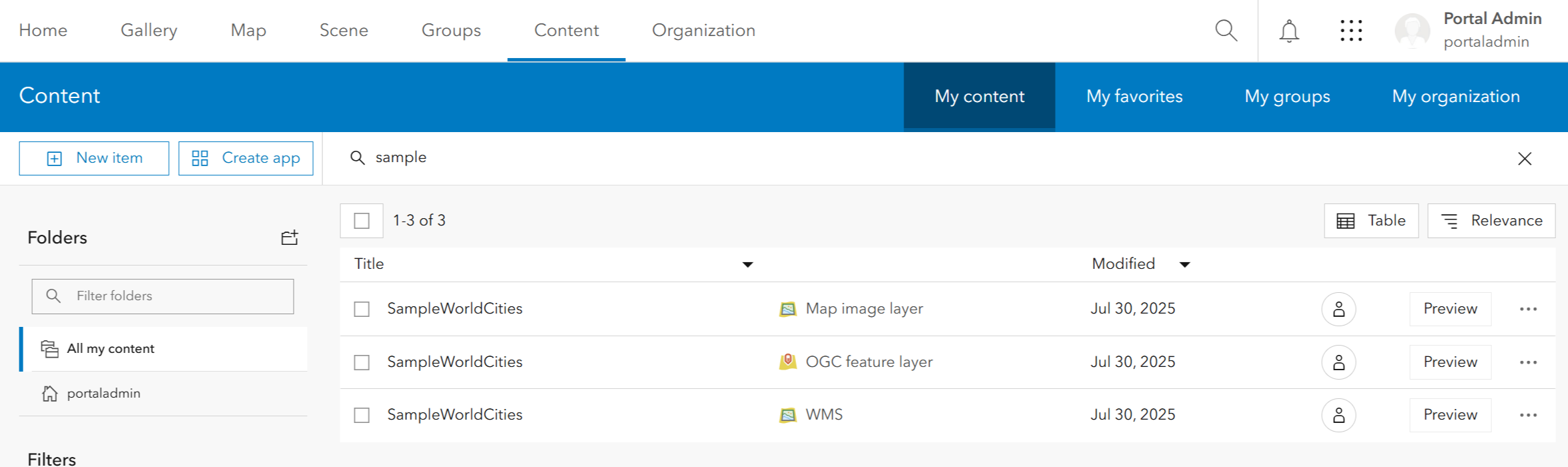
-
Click on the
 sharing button of the Map image layer.
If the sharing button is not present, click on the menu > View details > Share.
 -
Set the sharing level to Organization.
Now the map image layer is no longer publicly available and requires a login.
The sharing button switches to  .
.
If you have multiple layer types, change their sharing settings from public to organizational also.
Activate security.manager for a service
Next, you have to activate security.manager NEXT for the SampleWorldCities service using the security.manager Manager UI.
-
Log in to security.manager Manager UI as administrator.
-
Go to the Services section of the Service Manager pane.
-
Search for SampleWorldCities using the search function or by selecting the ROOT folder in the Folders column.
The
 in front of the service name indicates a deactivated security.manager.
 -
Click on the
 menu behind the service name and select Activate security.manager.
 -
In the opening dialog, click Activate.
-
Wait until the loading spinner changes to
 .
.
Now security.manager has been enabled for SampleWorldCities.
The service is
-
accessible for admin users as without security.manager.
-
accessible for non-admin users without content due to the activated security.manager NEXT without further policies.
-
not-accessible for anonymous users due to the sharing level.
Verify configuration
To verify the previous configuration, access the service metadata as an anonymous user and as a non-admin user.
-
In the Manager UI, click on
menu behind the service name SampleWorldCities. -
Select View service status information to see detailed information about security.manager NEXT and some links to the service.
-
Click on the link for Map service to open the service metadata in a new tab.
-
As admin user you will see the whole service metadata.
-
Copy the link and open a private browser.
-
As an anonymous user, you cannot access the service.
-
Log in as non-admin user and navigate to the SampleWorldCities service metadata.
-
As an authenticated, non-admin user you can access the service but cannot see any layers in the Layers section.
Summary
In this tutorial,
-
you changed the sharing level so that anonymous access is no longer possible.
-
you activated security.manager NEXT for SampleWorldCities without a policy.
Thus, authenticated, non-admin users can access the service but see no content.
For further details, refer to Sharing in ArcGIS Enterprise.
In the tutorial Create a basic policy you will learn how to allow authenticated users access to the service SampleWorldCities.